> For the complete documentation index, see [llms.txt](https://books.spartan-cybersec.com/cpad/llms.txt). Markdown versions of documentation pages are available by appending `.md` to page URLs; this page is available as [Markdown](https://books.spartan-cybersec.com/cpad/post-explotacion-en-windows/fundamentos-de-escalacion-de-privilegios-en-windows/que-son-altos-privilegios-en-windows.md).

# ¿Que son altos privilegios en windows?

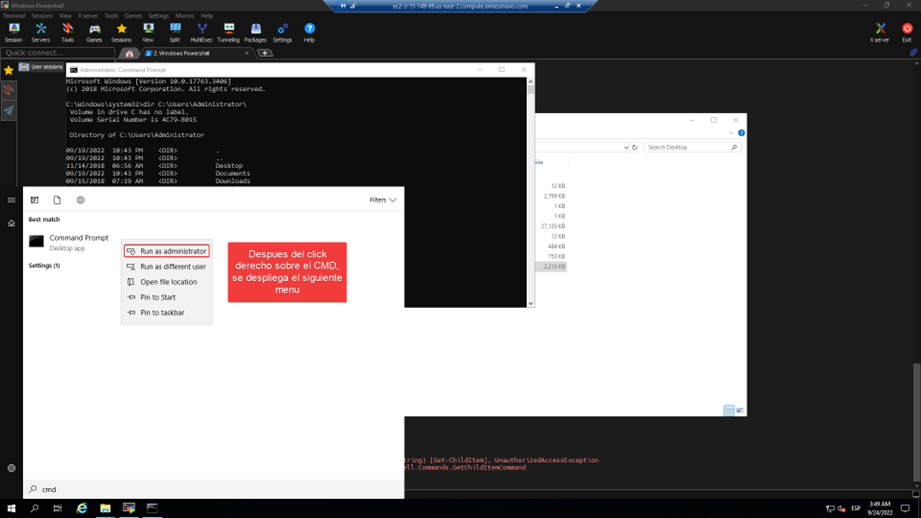
Iniciar el Command Prompt (CMD) con altos privilegios o como administrador significa ejecutar la consola de comandos de Windows en un modo especial que otorga al usuario permisos elevados para realizar tareas que afectan aspectos críticos del sistema operativo. Este modo se conoce comúnmente como "modo administrador" o "ejecución como administrador".

A continuación, se visualiza la apertura de un CMD con privilegios de administrador.

<figure><img src="/files/7fBuRZoVXma0u7iuoUUw" alt=""><figcaption></figcaption></figure>

Al iniciar CMD como administrador, el usuario obtiene acceso completo a todas las funciones y comandos del sistema. Esto incluye la capacidad de ejecutar programas y scripts con privilegios de administrador, modificar archivos en carpetas protegidas (como `System32`), cambiar configuraciones globales del sistema, administrar cuentas de usuario y sus privilegios, y realizar otras tareas administrativas que requieren permisos elevados.

En pocas palabras esta CMD estaría trabajando con un nivel de alta integridad y por lo tanto podría hacer operaciones privilegiadas localmente como adicionar usuarios al grupo de administradores.
<figure><img src="/files/0PXz1KHZNHYzqejop7fK" alt=""><figcaption></figcaption></figure>


---

# Agent Instructions
This documentation is published with GitBook. GitBook is the documentation platform designed so that both humans and AI agents can read, navigate, and reason over technical content effectively. Learn more at gitbook.com.

## Querying This Documentation
If you need additional information that is not directly available in this page, you can query the documentation dynamically by asking a question.

Perform an HTTP GET request on the current page URL with the `ask` query parameter, and the optional `goal` query parameter:

```
GET https://books.spartan-cybersec.com/cpad/post-explotacion-en-windows/fundamentos-de-escalacion-de-privilegios-en-windows/que-son-altos-privilegios-en-windows.md?ask=<question>&goal=<endgoal>
```

`ask` is the immediate question: it should be specific, self-contained, and written in natural language.
`goal` is optional and describes the broader end goal you are ultimately trying to accomplish on behalf of the user. GitBook uses it to tailor the answer towards what is most useful for that goal.

The response will contain a direct answer to the question and relevant excerpts and sources from the documentation.

Use this mechanism when the answer is not explicitly present in the current page, you need clarification or additional context, or you want to retrieve related documentation sections.
